
Terminal
Jaade is terminal-first. Real shells — backed by node-pty and rendered with xterm.js — are a first-class surface, not an afterthought. You can run agent CLIs, build commands, and everyday shell work right next to your files and review tools.
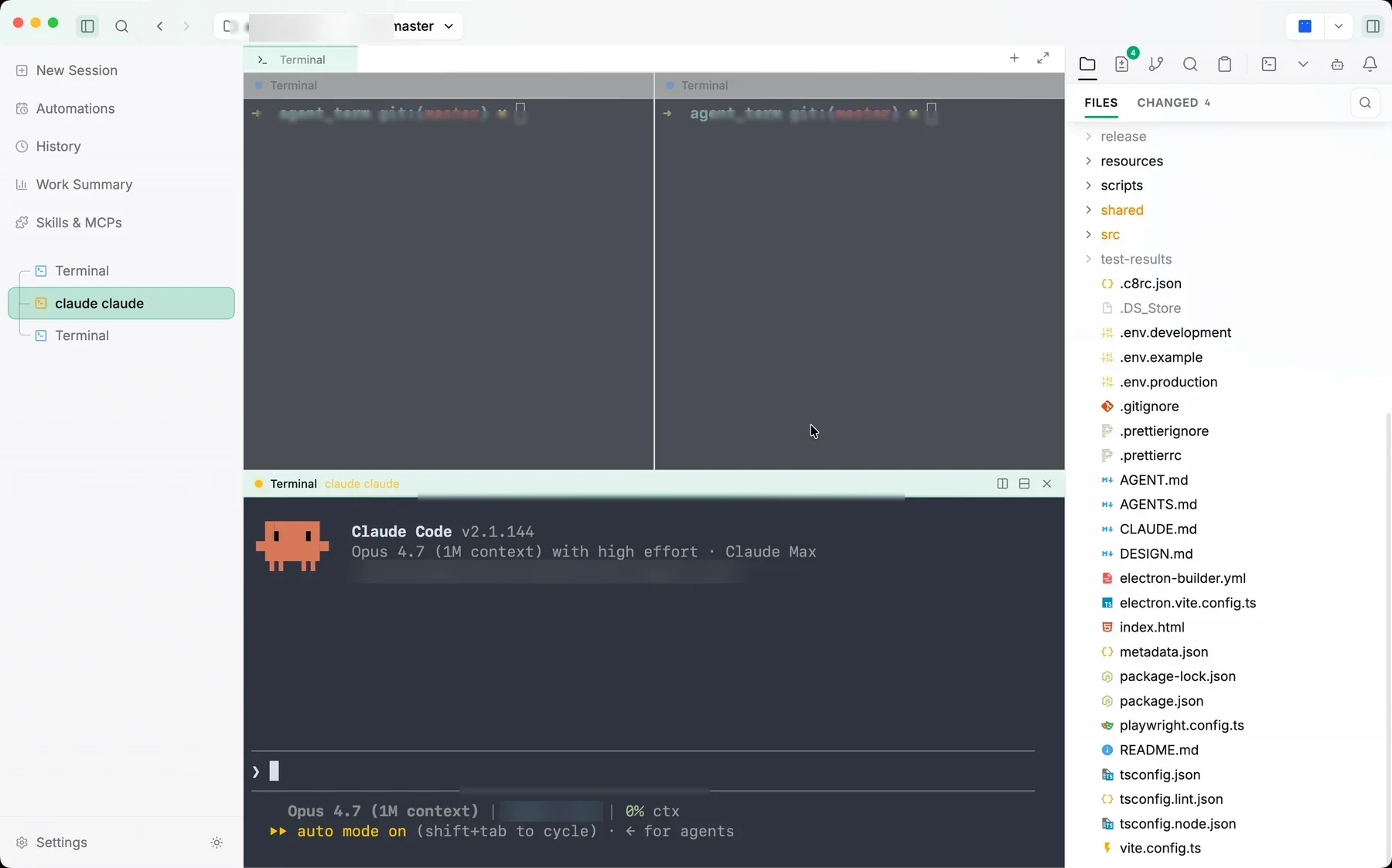
Terminals, tabs, and splits
- Terminal groups hold multiple tabs, with active tabs visually connected to the pane below and inactive tabs kept distinct.
- Split panes let you run several shells side by side. Each pane header carries dense, ghost-styled split and close controls.
- Terminals respawn with a replayed scrollback tail when a workspace is restored, so your context survives a restart (see workspace persistence).
Working in the terminal
- Search —
Cmd/Ctrl+Fopens a search overlay to find text in the scrollback and navigate matches. - Drag files in — drop a file onto a terminal to insert its path.
- Clickable commit hashes —
Cmd/Ctrl+Clicka git commit hash in the output to open that commit in the right sidebar's Git History panel. - Clickable filenames —
Cmd/Ctrl+Clicka file path in the output to open it in the file viewer. - Inactive pane dimming — unfocused panes can dim slightly so the active one stands out (configurable).
Run Actions
The right sidebar can hold a Run Actions toolbar — custom shortcuts for your common workspace commands (npm scripts, shell one-liners, and the like). Actions are per-workspace, reorderable, and persist across launches, so frequent commands are one click away instead of retyped.
Agents in the terminal
You can run agent CLIs (Claude Code, Codex, OpenCode, Cursor) directly inside a Jaade terminal, in addition to the in-app sessions. Two integrations make that nicer:
- Claude Code notifications. When
clauderuns in a Jaade terminal, its hook events surface as in-app toasts and OS notifications through a bundled plugin. See the install steps below. - Computer / Browser Use from the terminal. Jaade can register its bundled Computer Use and Browser Use MCP servers into the terminal agents' configs.
Enabling Claude Code notifications
When Claude Code runs inside a Jaade terminal, Jaade can turn its hook events into notifications. The bundled plugin is auto-copied into the app's support directory on startup; install it once from within Claude Code:
/plugin marketplace add ~/Library/Application\ Support/Jaade/claude-plugin
/plugin install jaade@jaade
Then reload Claude Code (/reload-plugins or restart). The plugin registers Notification, Stop (turn complete), and PermissionRequest hooks, and is safe to leave installed globally — its scripts no-op outside a Jaade terminal. To turn it off, run /plugin uninstall jaade@jaade.
Appearance
Terminals are themable and tunable in Settings → Terminal:
- Color themes —
system(follows the app theme) plus presets like Dracula, Nord, Tokyo Night, One Dark, Catppuccin Mocha, Solarized, Gruvbox, Monokai, Ghostty, and more. You can also save custom themes. - Typography — monospace font family, size (8–32), and line height. Optional ligatures for ligature-aware fonts.
- Cursor — block / bar / underline style, with optional blink.
- Behavior — scrollback length (up to 100,000 lines), login-shell mode (sources
.zprofile/.bash_profile), GPU acceleration, and inactive-pane dim level.
See Appearance configuration for the full list of keys.