
Mini Apps
Experimental
Mini Apps are an experimental feature. Enable them under Settings → Features → Enable Mini Apps (the master gate), then open the Mini Apps view from the left sidebar.
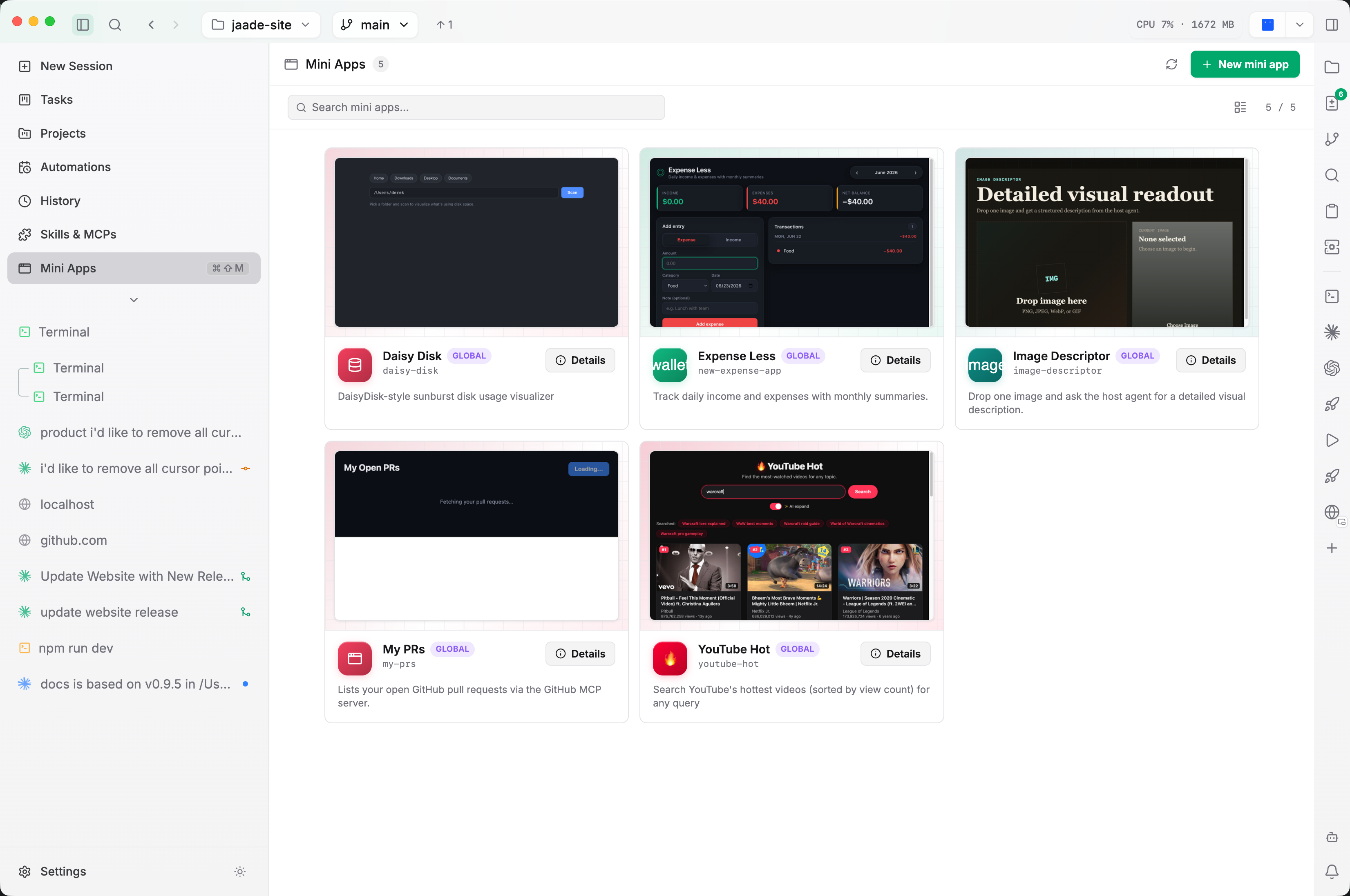
Mini Apps are small, single-window apps you build and run inside Jaade — dashboards, form-based utilities, visualizers, one-off tools. Each one is scaffolded from a template, versioned as its own git repository, and can (optionally) call the host agent. They give you a fast place to turn a throwaway script into a durable, inspectable tool without leaving the workspace or standing up a separate project.
Creating a mini app
Open the Mini Apps view and choose Create a mini app. The dialog collects:
- Name — the display name (e.g. Focus Timer). It auto-derives a kebab-case Id (
focus-timer) unless you edit the Id yourself. - Location (scope) — Project stores the app in the workspace under
.jaade/mini-apps/<id>/(travels with the repo), while Global stores it under~/.jaade/mini-apps/<id>/(available in every workspace). Scope is fixed after creation. - Description — an optional one-line summary shown on the card.
- Start from — a starter template (see Runtimes below).
- Build out (optional) — describe what the app should do, and Jaade hands the description to the
/jaade:create-mini-appskill so an agent scaffolds the implementation for you.
Finish with Create to return to the gallery, or Create & Open to scaffold and immediately launch the app.
Runtimes
A mini app uses one of two runtimes:
- Static — pure React + CSS bundled into a sandboxed iframe with no network, filesystem, or host access. Best for self-contained UIs (visualizers, timers, canvas/SVG). The Blank template starts here.
- Node-backed — a React frontend plus a
server.tsbackend running on127.0.0.1(loopback only). The frontend talks to it with same-originfetch('/api/...'), and the backend can use real Node modules (node:os,node:fs,node:http, …). Best when the app needs system metrics, file I/O, network calls, or the agent bridge. The Full-stack (Node) template starts here with a live CPU/memory monitor example.
Legacy A2UI apps
An earlier A2UI runtime (declarative agent-driven surfaces) was removed from the create flow in v0.9.15. Existing A2UI mini apps still build, open, and render — you just can't create new ones in that mode.
Agent bridge
Node-backed apps that declare capabilities in manifest.json get a narrow, frozen window.jaade bridge so they can call the host Claude agent on demand:
{
  "server": "server.ts",
  "capabilities": ["agent:ask", "agent:tools"],
  "mcpServers": ["github"]
}
The frontend calls:
const result = await window.jaade.agent.ask("Summarize this in one sentence.", {
  schema,      // optional JSON Schema for structured output
  maxTurns,    // bound the agent's turns
  images,      // optional image attachments (base64 PNG/JPEG/WebP/GIF)
  tools,       // namespaced MCP tools, e.g. "mcp__github__search_code"
});
if (result.ok) { /* result.text or result.structured */ }
The agent runs locked down by default (no filesystem or network, capped turns), agent:ask and agent:tools each require per-app consent on first use, and agent:tools calls are limited to your declared mcpServers allowlist. Static apps don't get the bridge — they run in an opaque-origin iframe the host can't reach.
Version history
Every mini app is its own git repository, initialized on first create or open. The detail view's History tab lists commits newest-first; click one to reveal a per-file diff pane, and use Revert to this version on an older commit to restore that state as a new commit (nothing is lost). Jaade auto-snapshots on open, and a banner with Commit now appears when it detects uncommitted edits — for example after an agent changed the source in another session.
Previews
Cards show a live screenshot preview: Jaade captures one shortly after an app finishes loading and again (best-effort) when you close the player window, so the gallery reflects the app's current look. Until a run produces a capture, the card shows the app's icon on its tile color. The gallery offers both a grid and a list view.
Running an app and its logs
Open an app from a gallery card or the detail pane to launch it in a locked-down player window. Node-backed apps start their backend automatically and stop it when the window closes; Cmd/Ctrl+W closes the player. For node-backed apps, the Logs tab streams the backend's stdout/stderr so you can debug it.
Editing metadata
The ⋯ → Edit menu in the detail pane changes an app's name, icon, and tile color (with an icon picker and a fixed color palette). To change the code itself, edit the source files or ask an agent via the /jaade:create-mini-app skill.
Related
- Skills, Plugins & MCP — the
/jaade:create-mini-appskill and the MCP servers a mini app can reach through the agent bridge. - Source Control & Git — Jaade's broader git tooling; each mini app carries its own repo.
- Projects — coordinate the sessions that build your apps.