
Core Concepts
A quick tour of the ideas and the layout the rest of the documentation builds on.
The building blocks
- Workspace — a project folder you have open. The workspace is the context every session, terminal, and file viewer runs in. Jaade tracks its git branch, changed files, and history.
- Session — a single agent run (a conversation with Claude Code, Codex, OpenCode, or Cursor). Sessions are inspectable and resumable: each preserves its prompts, transcript, model, and changed files.
- Agent — the coding assistant behind a session. Jaade supports four; see Agents.
- Project — an optional container that groups related sessions, with an optional master session that orchestrates workers. See Projects.
- Terminal — a real shell (PTY) running in the workspace. See Terminal.
The layout
Jaade's window has four main regions. Most features live in one of them, and the docs refer to these by name throughout.
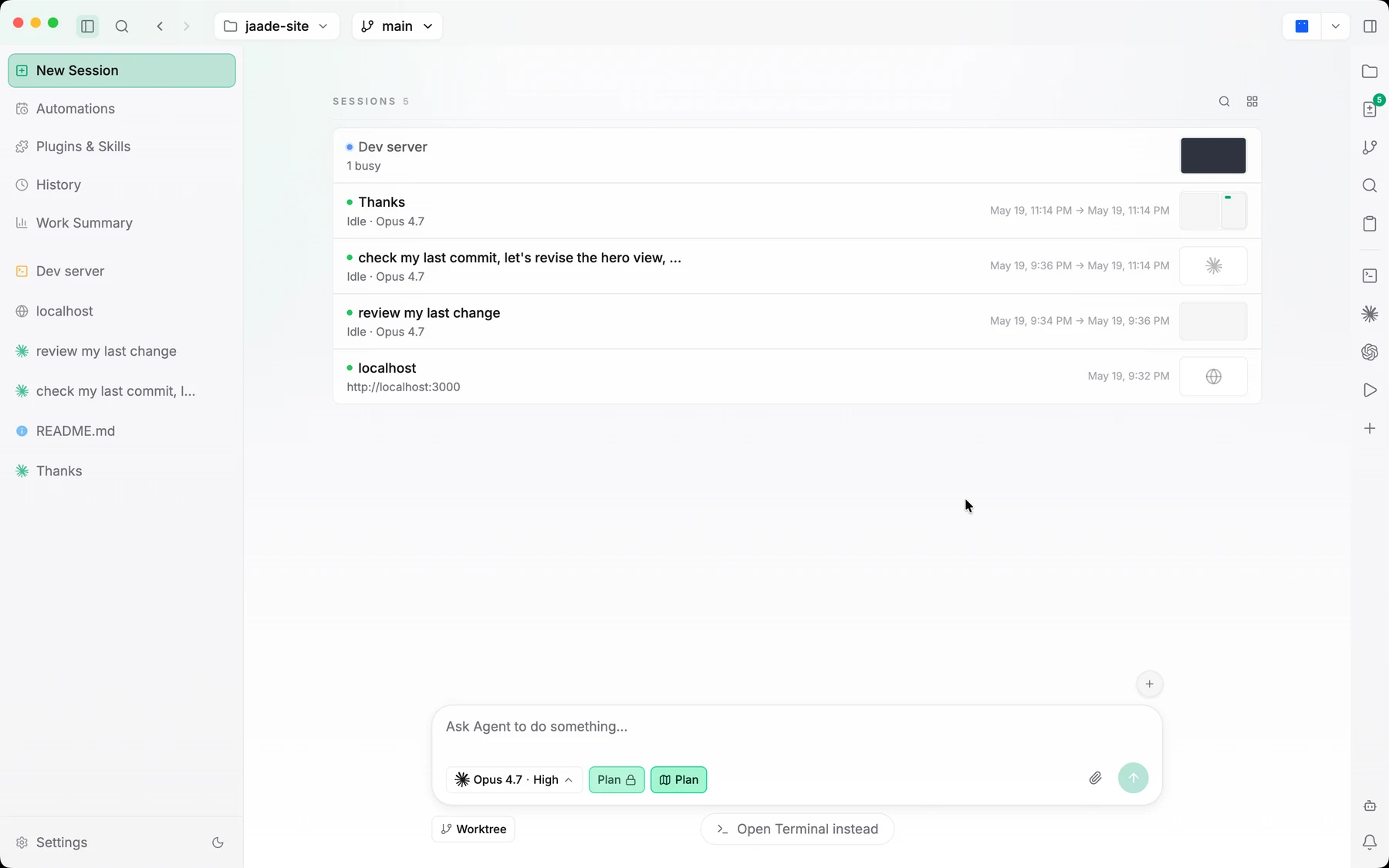
Title bar
Shows the workspace name and the git branch selector. When the branch tracks a remote, ahead/behind buttons (↑N / ↓N) push and pull right from here. The title bar also holds the button that opens Jaade Bot, the built-in assistant.
Left sidebar
The main workspace navigator. It lists your active sessions and terminal groups, grouped into collapsible project folders when they belong to projects (a project's master session is marked with a crown badge). It's also where you reach History, Work Summary, Skills & MCPs, Memories, Scheduled Tasks, the Task Board, and Settings.
Main pane
The large central area. It switches between Terminals, the New Task flow, the Dashboard, agent chats, Session Detail/History, the Task Board, Projects, Work Summary, Memories, Scheduled Tasks, and Skills & MCPs. It supports a tabbed, splittable workbench so terminals and file viewers can sit side by side.
Right rail (activity bar + panel)
A compact activity bar plus a contextual panel. The panels are:
- Files — the file explorer, which auto-reveals the file open in the viewer.
- Search — with a Name tab (fuzzy filename search) and a Content tab (ripgrep search).
- Source Control — staged/unstaged changes, diffs, and commit.
- Git history — the commit graph.
- GitHub — pull requests and issues.
- Paste History — a clipboard ring of recent copies.
- SSH Connections — remote terminals and SFTP, when SSH is enabled.
Sessions stay visible
The thread running through Jaade is that agent work should be inspectable. Rather than a single opaque "the agent is working" spinner, a session is a chat you can read, a Session Overview you can explore, a set of diffs you can review, and a transcript you can resume later. You set the model, effort, and permission mode up front, approve sensitive actions inline, and review changes before they land.
Things that just work
A few behaviors happen automatically, with no configuration:
- Workspace persistence. Jaade saves each workspace's open chats, file viewers, and terminals and restores them on the next launch — even after a crash. Chats come back idle and resume from their transcript, terminals respawn with replayed scrollback, and file viewers reopen at their saved line.
- In-app browser. Links that would open a new window — webview popups and
target="_blank"anchors — open in an in-app browser tab instead (http/https only;mailto:/file:and other schemes are left to the OS). - Context auto-compact. Long sessions automatically compact their context so they don't overflow the model's context window. This is on by default and configurable per agent — see Agents configuration.
- Update banner. When a new app version is available, a banner offers to update.