
Agents
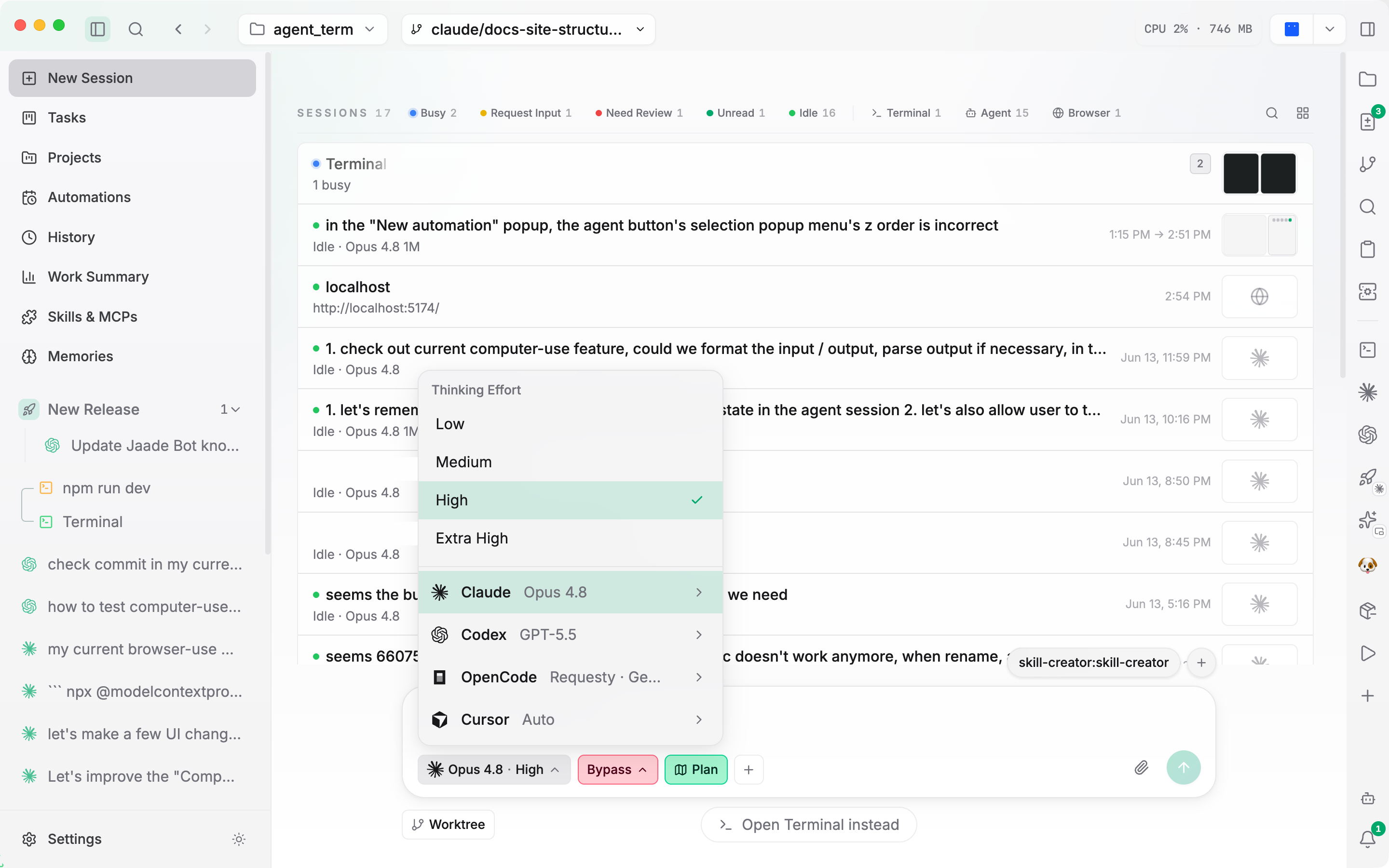
Jaade runs four coding agents — Claude Code, Codex, OpenCode, and Cursor — and lets you mix them across sessions. Each session picks its agent, model, reasoning effort, and permission mode up front. The default agent and default model live in Settings → Agent and can be changed at any time.
Permission modes
All four agents share the same permission model, selected at session start:
| Mode | Behavior |
|---|---|
default | Standard permission handling — prompts for sensitive actions. |
acceptEdits | Auto-accept edit operations. |
bypassPermissions | Bypass all permission checks. Most permissive — use carefully. |
Plan mode is a separate toggle on the new-session view (have the agent propose a plan before acting); it is not a permission mode.
Reasoning effort
Most agents expose a reasoning-effort level — low, medium, high (the default for Claude), and extra-high. Codex and Cursor report the levels their models actually support, so the available values can vary by model.
Claude Code
Claude Code is the default agent. Models run from most to least capable — including Fable 5, Opus, Sonnet, and Haiku tiers, several with 1M-token context variants. The current model list and default ship with the app and update as new models are released.
- Sign in with Claude. Settings → Agent → Sign in with Claude mints a long-lived claude.ai (Pro/Max) OAuth token so in-app sessions use your subscription instead of an API key.
- AWS Bedrock. When Claude is configured through Bedrock, the model picker can show family aliases (
opus,sonnet,haiku) with the configured inference-profile as context, and Jaade can surface an AWS auth-refresh action if a token expires. - Third-party providers. Claude Code can be pointed at Claude-compatible endpoints — Moonshot/Kimi, Zhipu/GLM, DeepSeek, or a custom one. See Agents configuration.
Codex
Codex offers a range of GPT-5 Codex models. In addition to the shared permission modes, Codex has a sandbox mode controlling filesystem access: danger-full-access (default), workspace-write, or read-only.
Codex plugins installed under ~/.codex/plugins appear in the Skills & MCPs view alongside Claude plugins. Plugins that ship a .claude-plugin manifest have their skills discovered and namespaced as <plugin>:<skill>; invoking one rewrites it into Codex's native markdown-link form and renders it as a styled chip. Project-scoped Agent Skills are read from <workspace>/.agents/skills and surface in the Codex @ menu. The bundled Computer Use plugin is auto-bridged into Codex when enabled.
OpenCode (experimental)
OpenCode is an experimental agent. Enable it under Settings → Features (an app restart is needed after toggling), then make sure the opencode CLI is on your PATH. Its model list is fetched dynamically from the OpenCode server's provider catalog and shown as Provider · Model.
Limitations: OpenCode does not support attachments (images/documents) and has no sandbox-mode setting.
Cursor (experimental)
Cursor is an experimental agent using the Cursor SDK. Enable it under Settings → Features and provide a Cursor API key (Settings → Agent → Cursor, or the CURSOR_API_KEY environment variable). A Test connection button validates the key. Models default to composer-2, with additional models fetched dynamically from Cursor.
Model pins
When an agent's model list is long (more than ~10 entries, as with OpenCode and Cursor provider catalogs), each model row has a pin toggle. Pinned models float to a Pinned group at the top of the picker, and pins are shared across the chat command bar and project pickers.
Context auto-compact
Long sessions automatically compact their context so they don't overflow the model's context window. This is on by default. For Claude it uses the SDK's built-in auto-compact; for Codex and OpenCode the app sends /compact once usage crosses a configurable threshold. It's suppressed on 1M-window models. See Agents configuration for the settings.
Related configuration
The full set of agent settings — default agent/model, per-agent reasoning effort and parameters, binary paths, sandbox mode, auto-compact thresholds, and third-party providers — is documented in Agents configuration.