
Projects
Projects are folder-like containers that group related agent sessions — optionally with a master session that orchestrates worker sessions through a task dependency graph. Projects are always available; there's no feature flag to enable.
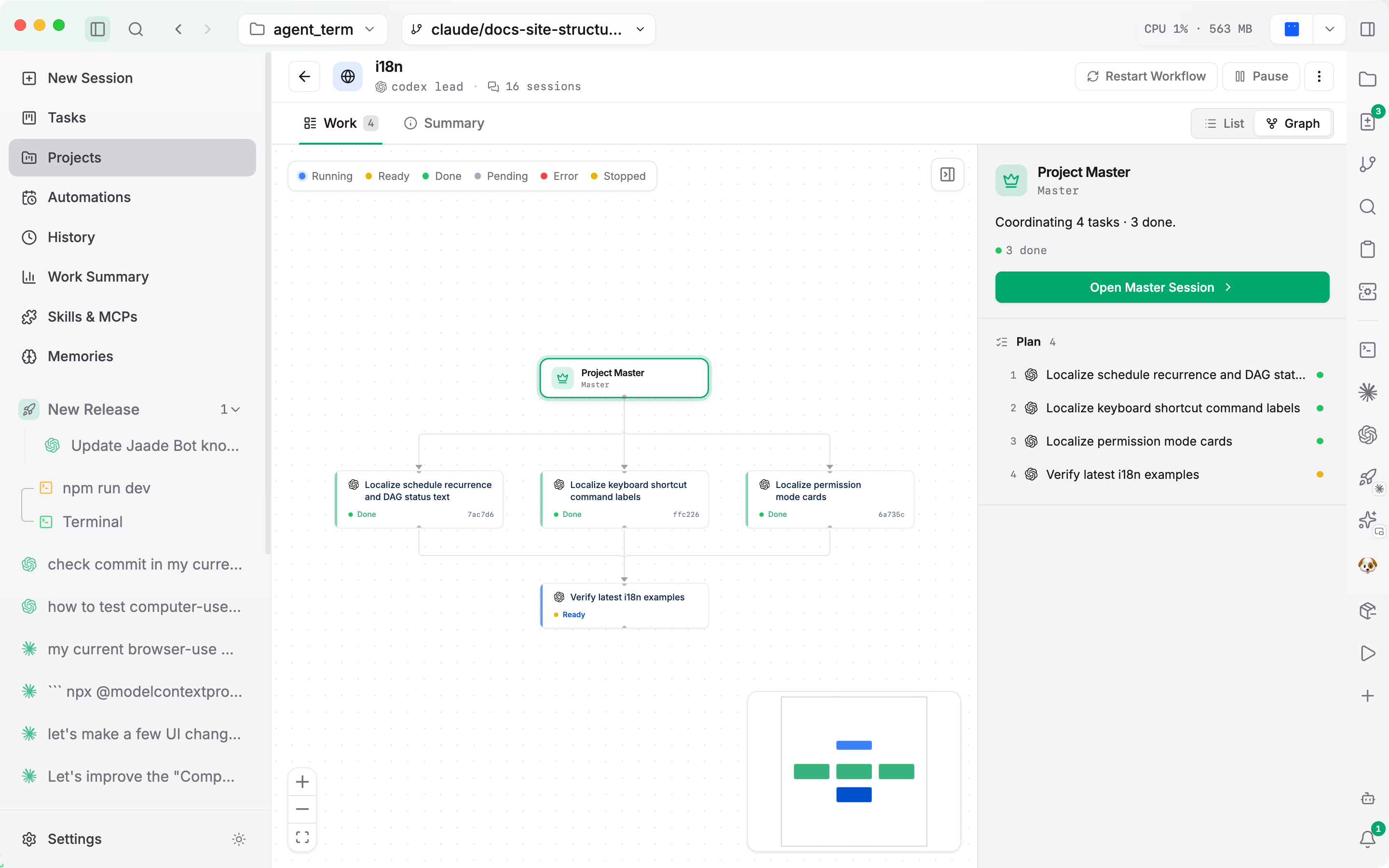
Where projects appear
- Left sidebar — sessions can be grouped into collapsible project folders, each with a colored icon badge. A session's project icon also appears as a small badge on its row, and a project's master session is marked with a crown badge. Right-click a project folder to open it, start a new session in it, pause/resume its master, or close all closable sessions.
- Projects view (main pane) — lists all projects with an Active / Archived filter. Each card shows its icon, name, session count, and running/paused state.
- Project detail has two tabs:
- Work — the project's sessions, with a List / Graph toggle (the graph is the Task DAG). A Project Master strip surfaces the master session and its DAG progress (done / running / error).
- Overview — the project goal, activity stats (total agent time, sessions run, duration), editable shared instructions, and lead-agent and created/updated metadata.
- Chat header — when a session belongs to a project, the header shows the project icon, name, and a
masterorworkerrole badge.
Master & worker sessions
A project can designate one optional master session. The master coordinates worker sessions through a Task DAG — a directed graph where edges encode "must finish before" dependencies. The DAG view (graph or list) shows each task's status — pending, ready, running, done, error, stopped — and its links; clicking a node selects it and can open its session.
The orchestration itself (defining the DAG, spawning workers, reporting status) is driven by the master session's own tools during the run. You set it up by prompting the master, not from a settings screen.
The workflow can be re-run from the start without redefining the graph: a Restart Workflow action (or the master's reset tool) resets every task's runtime state while keeping the DAG. The reset is refused while any worker is still running.
Terminal workers
Not every worker is an agent. A DAG task can run its prompt as a shell command in a workbench terminal instead. Terminal workers complete from the command's exit code (0 = done, non-zero = error); they don't appear in the session list and don't count toward the worker concurrency limit. The master can read a spawned terminal's recent output during or after the run.
Shared instructions
A project's shared instructions are injected into its sessions — for Claude they're appended to the system prompt (preserving Claude Code's built-in tools); for Codex, OpenCode, and Cursor they're merged into the first user turn wrapped in <project-instructions> tags. Spawned workers receive the instructions this way, so their kickoff prompt stays focused on the task.
Project configuration
Each project has its own settings (separate from the global Settings):
- Lead and worker agent · model · reasoning effort.
- Max concurrent workers (1–10, default 5).
- Pause / resume — a paused project spawns no new workers.
- Shared instructions injected into worker prompts.
- A custom icon / color, and archiving.